ES Install

MADRE 0.4.1 · Public beta

The agents you already have. One room. One memory.

Codex, Claude Code, Gemini CLI and OpenCode working together on your project: in one conversation, with a memory that keeps what was decided. It runs on your machine. No account, no cloud, free.

npx @jossuealcala/madre start

One command, on macOS and Linux.

  • macOS and Linux tested on every release
  • Node 22.5 or later
  • No dependencies all it needs is Node
  • Apache-2.0 free and open source

Install

Ready in a minute.

The command is the same on macOS and Linux. All you need is Node and at least one of your agents, signed in.

  1. Install Node 22.5 or later

    Node is the program that runs MADRE, and the only thing it needs. With Homebrew it installs with one command:

    brew install node

    Not using Homebrew? Download it from nodejs.org.

  2. Sign in to at least one agent

    Codex, Claude Code, Gemini CLI or OpenCode. MADRE uses the session you already have in each one; it never asks for another account. None yet? Open MADRE anyway: from the room it helps you install them and sign in.

  3. Open the room in your project

    In the Terminal, go to your project folder and run these two lines. MADRE finds your agents and opens the room in your browser.

    cd your-project
    npx @jossuealcala/madre start
  4. Add a local agent Optional

    With Ollama, @madre joins as a fifth agent: it runs on your machine, answers from what the room remembers and writes nothing.

    brew install ollama

    No Homebrew? MADRE offers the download from ollama.com.

  1. Install Node 22.5 or later

    Node is the program that runs MADRE, and the only thing it needs. Install it with your distribution’s package manager, or from nodejs.org. Then check the version:

    node --version
  2. Sign in to at least one agent

    Codex, Claude Code, Gemini CLI or OpenCode. MADRE uses the session you already have in each one; it never asks for another account. None yet? Open MADRE anyway: from the room it helps you install them and sign in.

  3. Open the room in your project

    In the Terminal, go to your project folder and run these two lines. MADRE finds your agents and opens the room in your browser.

    cd your-project
    npx @jossuealcala/madre start
  4. Add a local agent Optional

    With Ollama, @madre joins as a fifth agent: it runs on your machine, answers from what the room remembers and writes nothing. It installs with its official installer:

    curl -fsSL https://ollama.com/install.sh | sh

Where it opens

In your browser, at http://127.0.0.1:4317: an address that only exists on your machine. If that port is taken, MADRE uses the next free one.

Check your setup

It tells you which agents MADRE found and which ones are signed in, without opening the room:

npx @jossuealcala/madre doctor

What it does

One conversation, not four terminals.

Ask one agent and it answers. Ask another and it answers knowing what was already said. Ask for a round table and each one weighs in, in turn. No copying and pasting between windows.

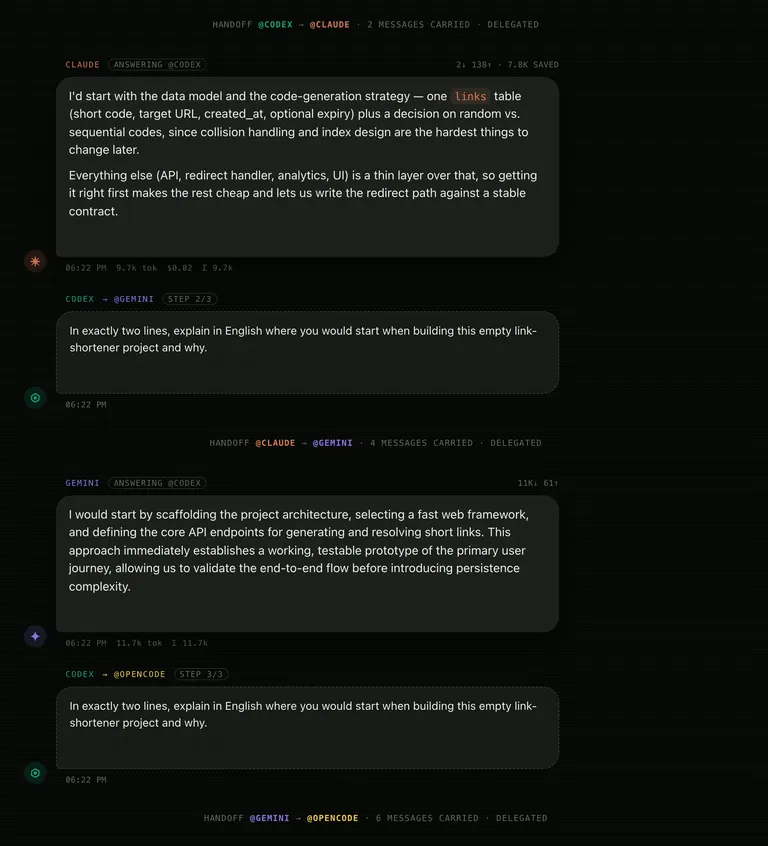
HANDOFF @CODEX → @CLAUDE · 2 MESSAGES CARRIED

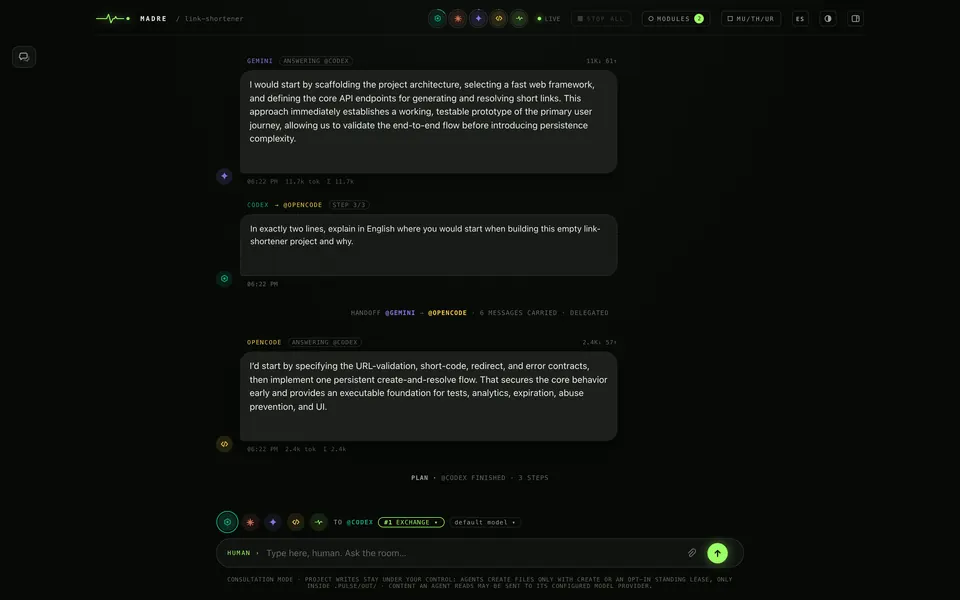
A round table in MADRE on an empty project. After the line “HANDOFF @CODEX → @CLAUDE · 2 MESSAGES CARRIED”, Claude proposes starting with the data model. Codex passes the turn to Gemini and “HANDOFF @CLAUDE → @GEMINI · 4 MESSAGES CARRIED” appears; Gemini answers and the turn moves on to OpenCode with 6 messages carried.
Two, four, six. Each agent receives everything said before its turn. That line is the whole idea of MADRE. A real round table on an empty project · MADRE 0.4.0 running locally, Sep 26 2026

How it works

From opening the room to a memory that stays.

  1. You open the room

    You type one command in your project folder. MADRE finds the agents you have and opens the room in your browser.

  2. You talk to an agent

    Pick it from the list or call it by name, like @claude. Every answer says who replied, with which permission, which model and how much of your plan it used, measured in tokens.

  3. The next one knows what was said

    When another agent takes the turn, it receives the conversation. The room shows it in one line, HANDOFF, with how many messages it passed on.

  4. The memory stays

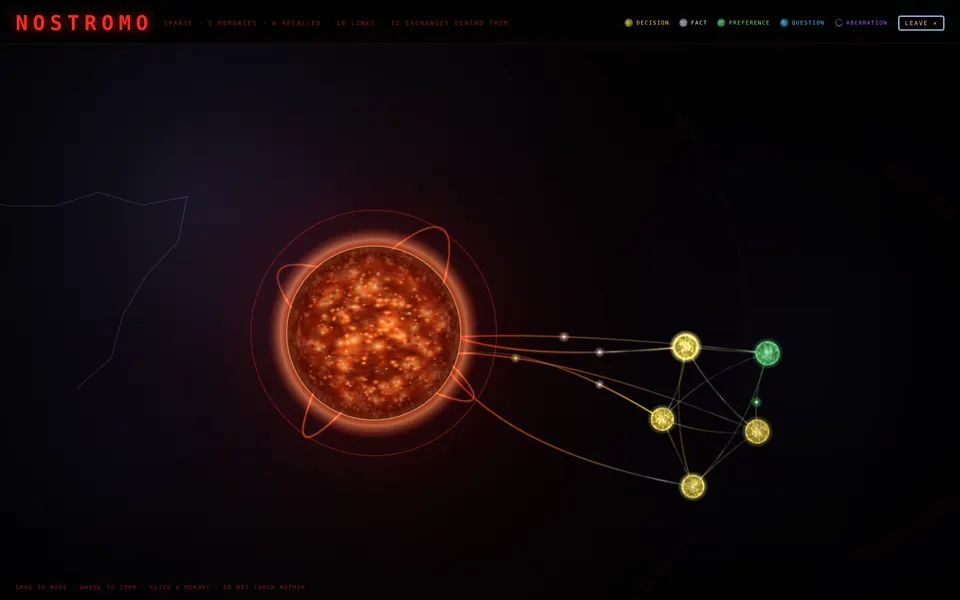
    Every ten exchanges, or after ten idle minutes, the room sums up what matters as notes: a decision, a fact, a preference or a question.

Three weeks later you ask “why did we pick Postgres?” and the room tells you, even if another agent made that call in another session.

First steps

The first thing you see.

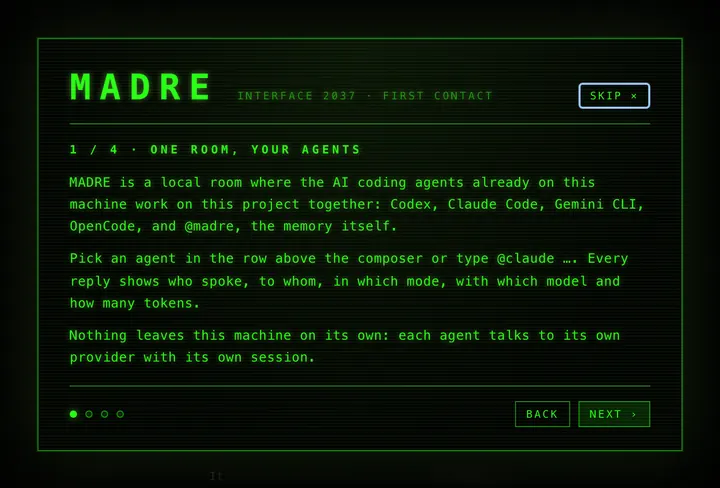
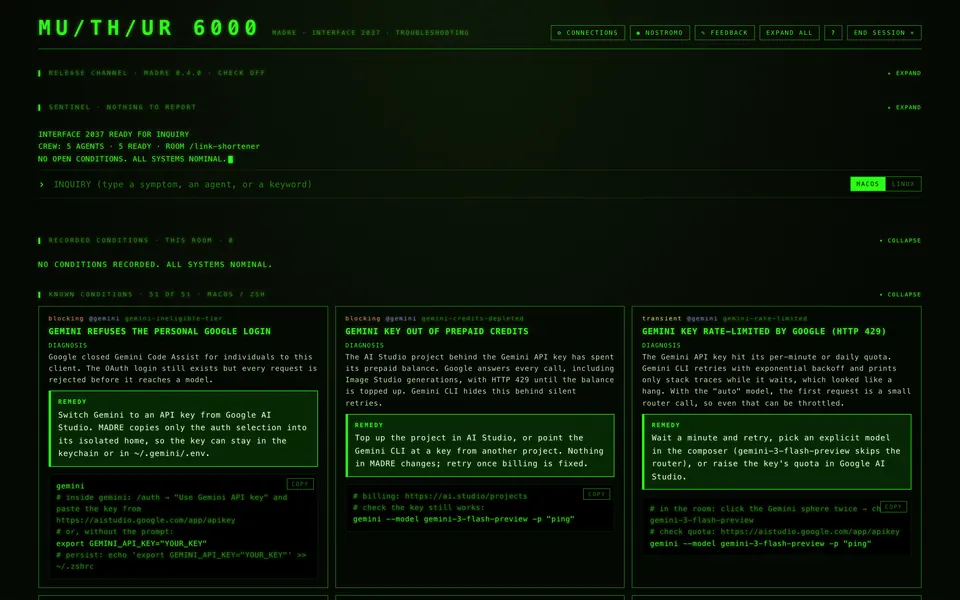
The first time, MADRE welcomes you with a four-screen tour: the room, the permission modes, the memory and MU/TH/UR, its diagnostic console. You can skip it.

Three things to try first. We did them for this page, on an empty project:

  1. @madre, ask the crew: where would you start this project, and why?
  2. Look at the HANDOFF lines: each agent answered knowing what the ones before had said.
  3. Ask for a change in #3 CONTROL, review the list of what changed and, if you don’t like it, roll it back with UNDO.
MADRE’s first screen, “Interface 2037 · First contact”, step 1 of 4: “One room, your agents”. It explains that MADRE is a local room where Codex, Claude Code, Gemini CLI, OpenCode and @madre work together on the project, and that nothing leaves the machine on its own.
MADRE 0.4.0 running locally, Sep 26 2026

Permissions

They read by default. They write when you say so.

Every message you send carries a permission, which MADRE calls a mode. That mode is the limit for everything the message sets in motion, and no agent can give itself more, not even by asking for it in its answer.

  • #0

    GHOST

    Off the record. Nothing is saved; gone on reload.

  • #1

    EXCHANGE Default

    Read the project and talk to the room. Writes nothing.

  • #2

    CREATE

    Add new files where they belong in the project. Existing files stay untouched.

  • #3

    CONTROL

    Edit the project itself, no approval per action. Override required.

  • #4

    AIRLOCK

    Run commands, push, deploy. What leaves the ship does not come back. Override, twice.

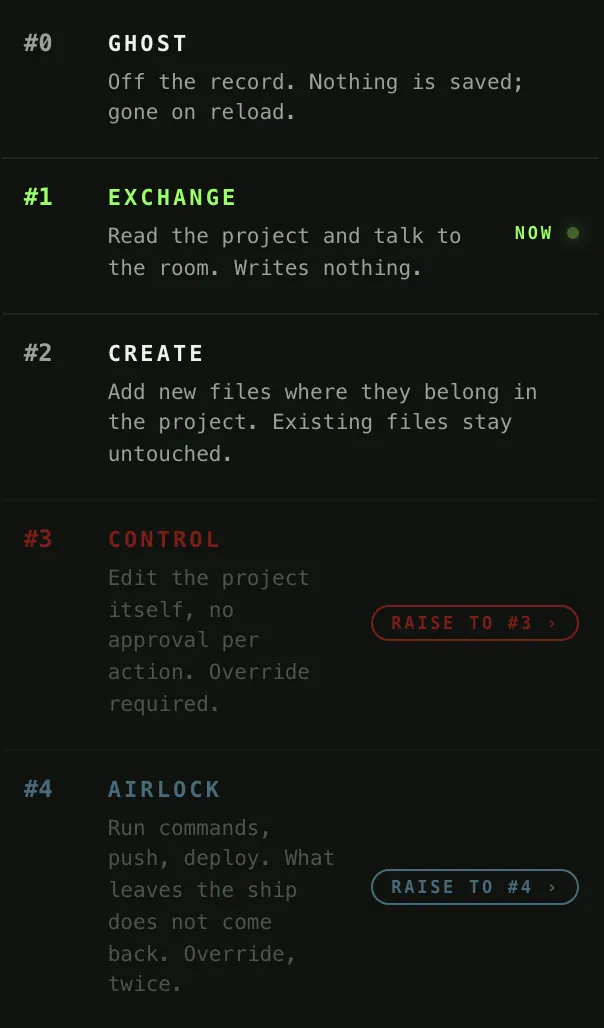
MADRE’s mode menu for a message to @codex. #1 EXCHANGE is active; #3 CONTROL and #4 AIRLOCK are dimmed, with “Raise to #3” and “Raise to #4”, because they need an override.
The real mode menu · MADRE 0.4.0, Sep 26 2026
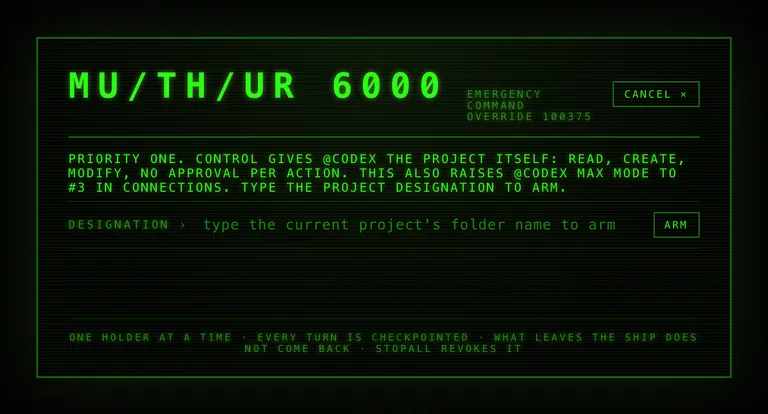
MADRE’s “Emergency command override” dialog: it warns that CONTROL gives @codex the whole project —read, create and modify with no approval per action— and asks you to type the project designation to arm.
The override, opened and cancelled · MADRE 0.4.0, Sep 26 2026

More permission is never an accident.

To turn on CONTROL, MADRE asks you to type the project’s folder name. AIRLOCK asks for a second key: typing the word AIRLOCK.

Once it is on, the room answers the way the ship would: SPECIAL ORDER 937 ACKNOWLEDGED.

AIRLOCK can run commands, git push and deploy. Use it as if you were lending that agent your terminal.

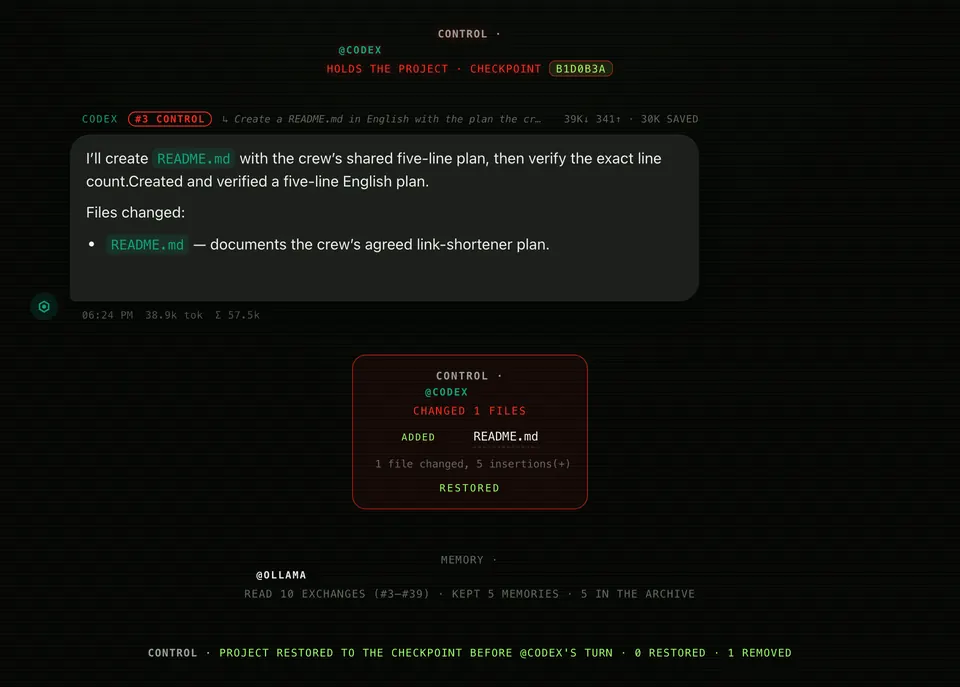
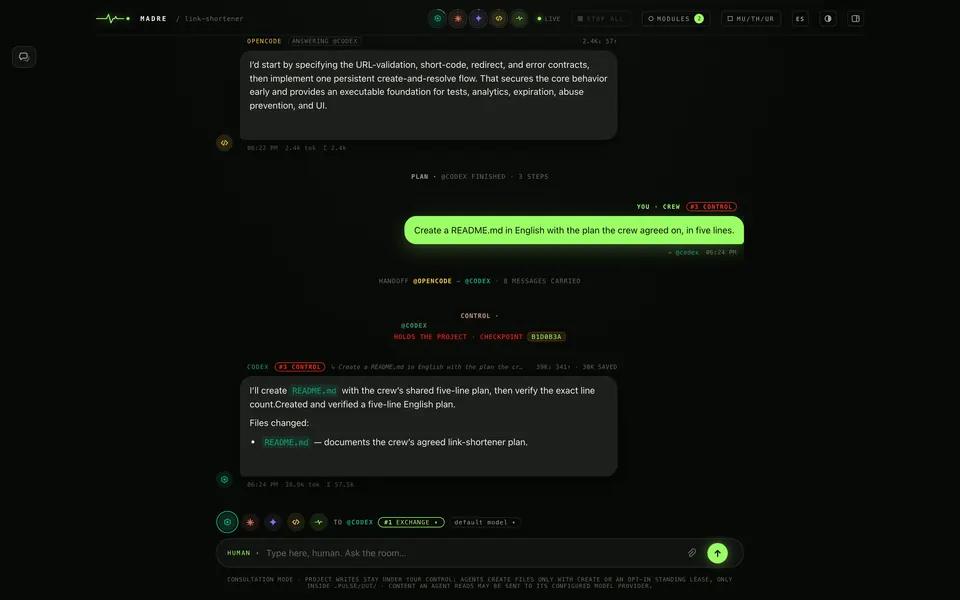
A CONTROL turn in MADRE. First the line “Control · @codex holds the project · checkpoint”. Codex creates README.md with the crew’s plan. Then the change block, “added README.md”, marked “restored”, and the line “Project restored to the checkpoint before @codex’s turn · 1 removed”.
A real CONTROL turn, rolled back with UNDO · MADRE 0.4.0, Sep 26 2026

And it can be undone.

Before editing, MADRE saves a restore point (a checkpoint). When it is done, it shows you the list of changes and a button to go back.

We tried it for this page: Codex created a README.md in CONTROL, we pressed UNDO and the file was gone from disk.

What MADRE is not

This matters more than any feature.

  • There is no cloud. MADRE has no servers and no accounts. It runs only on your machine (at 127.0.0.1) and stops when you close the terminal.

  • It does not keep your keys. If you give it an access key, it stores it where that agent looks for it, locked to your user, and keeps no copy. The room notes that a key was set; never the key.

  • Your agents don’t go through MADRE. What an agent reads goes straight to its provider, with your account and your limits, just as if you used it in your terminal.

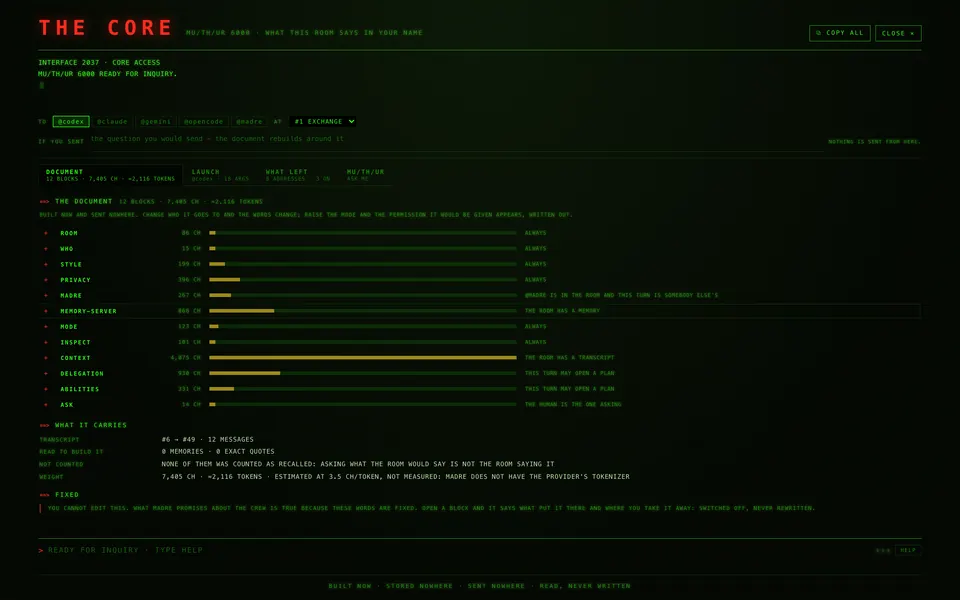
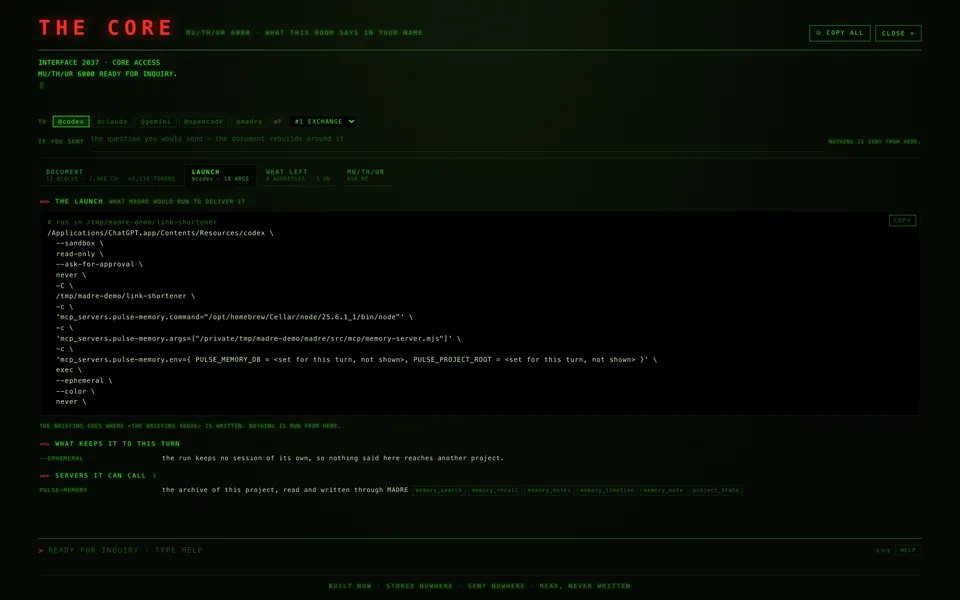
  • And you can check all of it. Inside the room you can open the exact document MADRE hands each agent on your behalf, the exact command it launches it with, and the list of every address MADRE can connect to, each with its switch.

  • Nothing else to install. All it needs is Node: zero third-party dependencies, not to use it and not to build it.

  • It is not another AI to pay for. MADRE brings no model of its own and no subscription. It is free, open source and works with the agents and sessions you already have. @madre, optional, runs on your machine with Ollama.

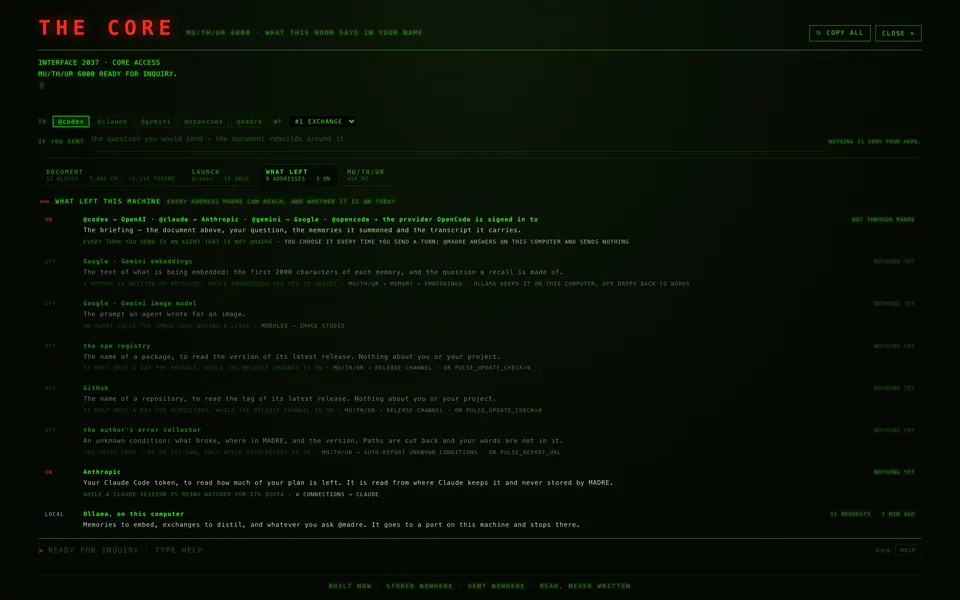
MADRE’s “What left this computer” screen. It lists every destination: the agents towards OpenAI, Anthropic, Google and OpenCode’s provider, marked “doesn’t go through MADRE”; the release check on npm and GitHub, off; the error collector, off; the Claude quota read; and Ollama, local.
What MADRE checks on its own is on screen too. The check for new releases, how much of your Claude plan is left, and error reports, which ship switched off. Each one with its switch. MADRE 0.4.0 running locally, Sep 26 2026 · the release check shows as off because we disabled it while capturing

What’s new · 0.4.1

What MADRE 0.4.1 brings.

Released September 27, 2026. The most important parts of this version, in a few words.

  • Fixes in Spanish. The instructions to solve each problem are in Spanish, with the button names you see on screen.

  • A button where there was a command. Eight problems are now solved with a button in CONNECTIONS, with no commands to type. The command is still there for anyone who prefers the terminal.

  • Alerts you can close. Each row of the log is dismissed with its ×, or all at once, without erasing the history. The MU/TH/UR badge counts only what is still open.

  • Image Studio finds your key. The module that makes images now reads your Gemini key where MADRE stores it, on Linux too.

  • PLAYWRIGHT connects. The browser the agents use now starts: a piece was missing from its command. And it now also checks that the browser is installed.

  • An agent that updates itself. If Codex, Claude or another agent updates while the room is open, MADRE explains it instead of showing a technical error. Reopening the room finds the new version.

And more: MU/TH/UR warns you when an API key in your setup (ANTHROPIC_API_KEY) makes Claude bill the API instead of your plan, the language you pick switches the whole interface, and EYECAT speaks Spanish. See every change

Compatibility

Tested on macOS and Linux.

Every release is tested automatically on both systems, with Node 22 and 24.

See the run on GitHub Actions
Automated tests for release 0.4.1
SystemNode 22Node 24
macOSpassedpassed
Linuxpassedpassed

Requirements

  • macOS or Linux
  • Node 22.5 or later
  • At least one agent: Codex, Claude Code, Gemini CLI or OpenCode
  • Optional: Ollama, for @madre

What is tested: that MADRE passes its tests, packs, installs and that its self-check (doctor) answers. What can’t be tested there: the conversation with real agents, because those machines have no signed-in sessions.

Windows? There is code for Windows, but it isn’t tested automatically yet. That is why we don’t list it as supported.

Questions

Worth knowing first.

Do I need to create an account?

No. MADRE has no accounts, servers or cloud. It uses the sessions your agents already have on your machine.

Which agents does it work with?

Codex, Claude Code, Gemini CLI and OpenCode. If you install Ollama, also @madre: a local agent that answers from what the room remembers and writes nothing.

How much does it cost?

Nothing. MADRE is free and open source (Apache-2.0 license). Each agent uses your own account and your limits with its provider, just like today.

Does it work on Windows?

We can’t promise it yet. The code accounts for Windows, but the automated tests only cover macOS and Linux, so we don’t list it as supported.

Does my code leave my machine?

MADRE runs on your machine. What an agent reads goes to its provider with your account, just as if you used it in your terminal, and it doesn’t go through MADRE. What MADRE checks on its own is listed in the room with its switch: the daily check for new releases, how much of your Claude plan is left, and error reports, which ship switched off.

What if an agent changes something I didn’t want?

By default, agents only read. For them to edit, you raise the mode to CONTROL by typing the project’s folder name. Before editing, MADRE saves a restore point, and UNDO takes the project back to that moment.

What language do the agents answer in?

Whatever they are configured for: MADRE uses your sessions as they are. The room itself is in Spanish or English, and the EN button switches between them.

Which Node version do I need?

Node 22.5 or later. The automated tests use Node 22 and 24.

Open it in a project you already know.

npx @jossuealcala/madre start

Or review the code first, on GitHub